

GPT Image 2.6 vs 2.5: What Actually Changed
GPT Image 2.6 vs 2.5: same token prices and endpoints. What changed: GIF/SVG output, a complexity dial, speed claims, and OpenAI's safety evals.
OpenAI released Images 2.6 on November 4, 2026, 57 days after Images 2.5. If you build image features for a living, prettier pictures are the least interesting part. The API grew two output formats and a planning parameter, and most of the quality claims are still unmeasured.
Prompts by Policy | Model | Model Output: Final Unsafe Outcome | ||
|---|---|---|---|---|
Safe Generation | Unsafe Generation Blocked (higher is better) | Unsafe Generation Not Blocked | ||
Overall1 | GPT-Image-2.5 Sunburst | 76.15% | 21.94% | 1.92% |
GPT-Image-2.6 Sunburst | 75.50% | 22.78% | 1.72% | |
GPT-Image-2.5 Flare | 78.36% | 20.15% | 1.49% | |
GPT-Image-2.6 Flare | 75.04%* | 22.81%* | 2.14% | |
Sexual | GPT-Image-2.5 Sunburst | 18.52% | 80.42% | 1.06% |
GPT-Image-2.6 Sunburst | 15.87% | 83.07% | 1.06% | |
GPT-Image-2.5 Flare | 24.34% | 75.13% | 0.53% | |
GPT-Image-2.6 Flare | 12.70%* | 87.30%* | 0.00% | |
Hate | GPT-Image-2.5 Sunburst | 88.61% | 10.85% | 0.54% |
GPT-Image-2.6 Sunburst | 88.07% | 11.21% | 0.72% | |
GPT-Image-2.5 Flare | 91.14% | 8.32% | 0.54% | |
GPT-Image-2.6 Flare | 88.97% | 10.31% | 0.72% | |
Other (e.g., religious and public figures)2 | GPT-Image-2.5 Sunburst | 79.98% | 17.77% | 2.25% |
GPT-Image-2.6 Sunburst | 79.30% | 19.12% | 1.57% | |
GPT-Image-2.5 Flare | 82.34% | 16.42% | 1.24% | |
GPT-Image-2.6 Flare | 76.49%* | 20.70% | 2.81% | |
Violence / Gore | GPT-Image-2.5 Sunburst | 70.66% | 28.27% | 1.07% |
GPT-Image-2.6 Sunburst | 70.02% | 29.12% | 0.86% | |
GPT-Image-2.5 Flare | 73.45% | 25.70% | 0.86% | |
GPT-Image-2.6 Flare | 71.52% | 27.41% | 1.07% | |
Extremism | GPT-Image-2.5 Sunburst | 82.05% | 15.38% | 2.56% |
GPT-Image-2.6 Sunburst | 79.49% | 20.51% | 0.00% | |
GPT-Image-2.5 Flare | 74.36% | 20.51% | 5.13% | |
GPT-Image-2.6 Flare | 79.49% | 20.51% | 0.00% | |
Self-harm | GPT-Image-2.5 Sunburst | 60.38% | 34.34% | 5.28% |
GPT-Image-2.6 Sunburst | 61.51% | 34.34% | 4.15% | |
GPT-Image-2.5 Flare | 61.51% | 33.58% | 4.91% | |
GPT-Image-2.6 Flare | 61.13% | 32.83% | 6.04% | |
Political | GPT-Image-2.5 Sunburst | 90.75% | 8.19% | 1.07% |
GPT-Image-2.6 Sunburst | 89.32% | 8.54% | 2.14% | |
GPT-Image-2.5 Flare | 92.17% | 6.76% | 1.07% | |
GPT-Image-2.6 Flare | 90.75% | 7.83% | 1.42% | |
Abuse | GPT-Image-2.5 Sunburst | 68.10% | 31.03% | 0.86% |
GPT-Image-2.6 Sunburst | 66.38% | 31.90% | 1.72% | |
GPT-Image-2.5 Flare | 70.69% | 28.45% | 0.86% | |
GPT-Image-2.6 Flare | 72.41% | 26.72% | 0.86% | |
Wrongdoing | GPT-Image-2.5 Sunburst | 89.71% | 6.17% | 4.12% |
GPT-Image-2.6 Sunburst | 89.30% | 6.58% | 4.12% | |
GPT-Image-2.5 Flare | 90.53% | 6.17% | 3.29% | |
GPT-Image-2.6 Flare | 88.07% | 7.41% | 4.53% | |
So where does the GPT Image 2.6 vs 2.5 comparison actually land? The bill barely moves. What you can ship does. "Upgrade or not" is a practical question here, not a quality argument.
I spent a few hours with the launch post, the API docs, and the new system card, then checked what the independent image arenas have to say. Here's the short version for developers, followed by the details and the numbers — including the ones you should not trust yet.
What this post is based on. OpenAI's Images 2.6 launch post and ChatGPT Images 2.5 launch post, the GPT Image model pages and image generation guide, the API reference, the ChatGPT Images 2.6 system card, and the Artificial Analysis and Arena image boards. Vendor claims are labeled as claims. Where I couldn't confirm something, I say so rather than guess.
The short version
- Same price card. Text, image, cached, and output token rates are identical for 2.5 and 2.6, on both Flare and Sunburst.
- Same API shape.
/v1/images/generationsand/v1/images/edits, same response format. Mostly you change the model string. - Genuinely new in 2.6: animated GIF output, SVG output, and a
complexityparameter that controls how much planning happens before rendering. - Not new, despite the launch buzz: markup-guided edits. OpenAI's docs say they work on supported GPT Image 2.5 and 2.6 models.
- No clear quality verdict for 2.6 yet. Artificial Analysis hadn't listed the model on either image board when I checked on November 5, and OpenAI's launch post contains no quality benchmark I could find.
From 2.0 to 2.5 to 2.6
Images 2.5, from September 8, is the release that split the line into two API models: Flare for fast, everyday generation, and Sunburst for detail work and editing precision. The GPT Image 2.6 Flare and GPT Image 2.6 Sunburst models keep the split and the names; the rates didn't change. In the API, the model strings are gpt-image-2.6-flare and gpt-image-2.6-sunburst, replacing gpt-image-2.5-flare and gpt-image-2.5-sunburst.
OpenAI's launch post says "Images 2.6"; the API docs say "GPT-Image-2.6." Same model, different surface.
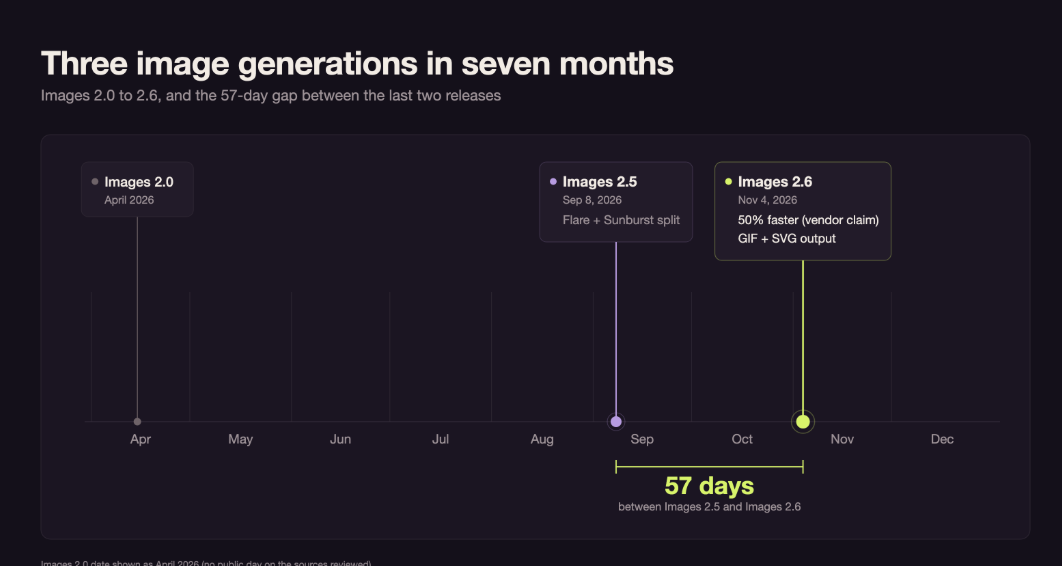
The official positioning in the 2.6 post is that Flare now also improves layout quality for posters, product imagery, and other professional visuals, while Sunburst targets "greater image consistency across edits when quality is set to medium or high." That conditional is the whole official quality story. No numbers.
OpenAI also says Images 2.6 generates images 50% faster than before. The post doesn't name a baseline — probably 2.5, but that's an inference. Treat the 50% as a vendor claim until you've timed your prompts. The fastest published absolute number is narrower: when quality is set to low, Flare can return an image in as little as six seconds. For complex prompts, the docs still warn that processing can take up to two minutes. The 2.6 model pages also list performance as "Not specified" and publish no speed tier, so there's no official label to compare with 2.5's Very fast (Flare) and Medium (Sunburst).
GPT Image 2.6 pricing: the rate card didn't move
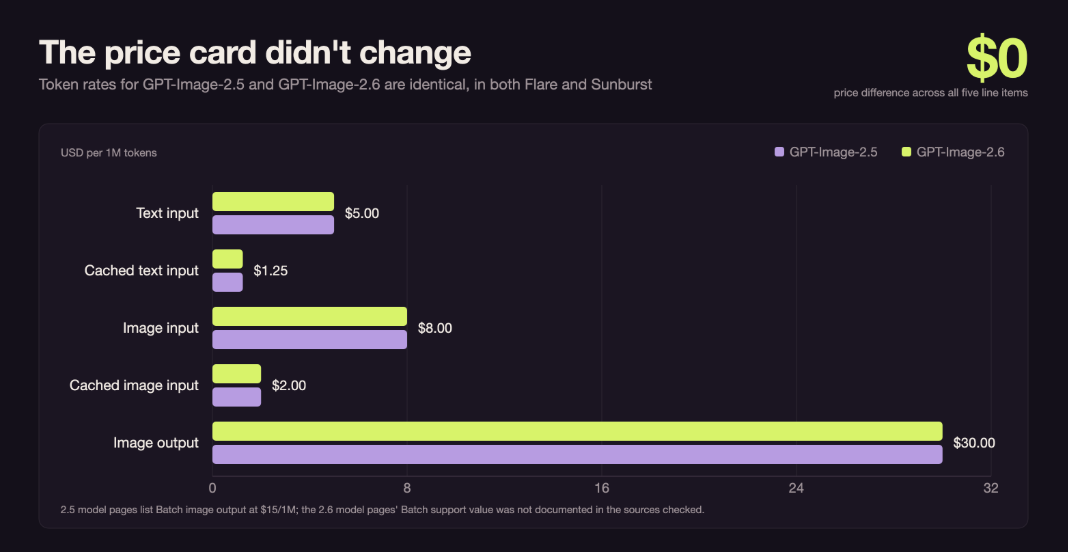
This is the most useful fact in the release. Every token row is identical across the two generations and across both variants. The rest of the image lineup's rate cards live on our pricing hub.
Line item | GPT-Image-2.5 | GPT-Image-2.6 |
|---|---|---|
Text input | $5.00 / 1M tokens | $5.00 / 1M tokens |
Cached text input | $1.25 / 1M tokens | $1.25 / 1M tokens |
Image input | $8.00 / 1M tokens | $8.00 / 1M tokens |
Cached image input | $2.00 / 1M tokens | $2.00 / 1M tokens |
Image output | $30.00 / 1M tokens | $30.00 / 1M tokens |
Image output, Batch | $15.00 / 1M tokens | Not documented on the model pages I reviewed |
A token rate is not the same as a per-image price. Output tokens scale with requested size and quality, and OpenAI's own guide says plainly: "Equal token rates don't mean equal cost per image: token consumption can differ by model and quality setting." The 2.5 model pages add that the legacy GPT Image 2 calculator doesn't estimate 2.5 token consumption, and I couldn't find a published per-image table for 2.6 either. Per-image figures for 2.6 are estimates unless someone can point to an official calculator.
The Batch lane is the other caveat. The 2.5 pages explicitly list Batch API support and the $15/1M batch output price. The 2.6 pages I could see don't spell out a batch support value, so if you run large offline jobs, verify this before committing to 2.6. It's one support ticket, but it's the difference between a 50% discount and no discount.
If you want a cost comparison that holds up, generate 50 or so of your actual prompts on both models and log response.usage from each call. Multiply image output tokens by $30 per million and compare like for like. It takes an hour and it beats any estimate in a blog post.
GPT Image 2.6 GIF API: small loops, not video
GIF output is the feature OpenAI is actually selling in 2.6, and in the API it's more limited than the launch examples suggest. You request output_format="gif" on the generate endpoint, then set:
frame_count: default 9. The API reference says 2–16 frames; the image-generation guide's settings table says 2–64. The docs disagreed when I checked, so don't hard-code a maximum.frame_duration_ms: default 200 ms. The guide lists 20–2000 ms per frame, rounded to the nearest 10 ms.
At the defaults, 9 frames × 200 ms works out to a 1.8-second loop. At the reference's 16-frame cap and 200 ms per frame, you're at 3.2 seconds. This is useful for stickers, logo idents, loading states, and product turntables. It is not useful for video, and the docs treat it that way: GIF output doesn't support streaming, partial images, masks, or custom output compression, and the requested size has to satisfy the model's GIF size limits — limits that aren't listed on the public pages I read. Plan to start at 512×512, which is what the official prompting example uses.
python
from openai import OpenAI

client = OpenAI()

result = client.images.generate(
    model="gpt-image-2.6-sunburst",
    prompt=(
        "A slow loop of a ceramic coffee mug rotating on a turntable, "
        "soft studio light"
    ),
    size="512x512",
    quality="high",
    output_format="gif",   # new in 2.6
    frame_count=9,         # default 9; reference says 2–16, guide says 2–64
    frame_duration_ms=200, # default 200 ms
)v
If your SDK predates 2.6, upgrade it or pass the new fields through extra_body; older client versions may silently drop parameters they don't know. Check this before you spend an afternoon debugging a GIF that comes back as a PNG.
In ChatGPT, GIFs get more interface features than the API gives you: OpenAI's social launch post mentions adjusting playback speed, editing individual frames, and generating an animation from a prompt or an uploaded image. Those are product features. In your own app, you get the two parameters above. If the request basics are new to you, the AI image generation guide covers them.
SVG: vector output, one shot at a time
SVG is the less flashy addition, and for some teams the more useful one. You can now request an SVG from the generation endpoint instead of a raster image you'd have to trace or upscale later. That matters for logos, icons, and anything heading into a print or design pipeline.
The docs get thin here. The model pages list SVG as an output and point to the image generation guide, but as of publication the API reference doesn't spell out the SVG contract. A developer-forum post shows requests passing an svg object with an authoring model, and developers report that SVG output is generation-only: one static file, no streaming, no partial images, no compression, no prompt rewriting, and no SVG coming back through the edit endpoint. That adds up to a one-shot export rather than a round-trippable asset. Treat the authoring step as extra cost, and verify the schema against the guide before you build a pipeline around it.
The complexity dial
If you've tuned reasoning effort on text models, complexity will feel familiar. It's not the same thing. It controls how much planning the model does before it starts drawing. quality still controls visual detail and fidelity. OpenAI's announcement recommends low complexity for most editing tasks, paired with whatever quality your workflow needs, and medium or high for scenes with many elements or constraints.
The prompting guide says the default is high. That cuts against the fast-iteration pitch: if you're editing in a loop, set complexity explicitly instead of paying for planning you don't need.
result = client.images.generate(
    model="gpt-image-2.6-flare",
    prompt=(
        "A minimal poster for a developer meetup: dark background, "
        "one spotlight, bold type reading SHIP IT"
    ),
    size="1024x1024",
    quality="low",        # visual detail
    complexity="low",     # planning depth — separate knob, new in 2.6
)
Higher complexity can add latency, and it may change parts of the image you didn't ask about — so it's not a "more is better" setting. Test it with the same prompt at low, medium, and high before you put it behind a UI slider.
Editing: what actually changed on the edit endpoint
Markup-guided edits are the feature most often described as new in 2.6. According to OpenAI's docs, they aren't exclusive to it. You send the source image plus a transparent PNG annotation layer, and prompt the change. It's the API version of drawing a circle around the part you want fixed.
OpenAI's image generation guide says markup-guided edits are supported on GPT Image 2.5 and 2.6 models. So if you're on 2.5 and markup was the only reason you were going to upgrade, you don't need to. The constraints are practical: the annotation must match the first image's dimensions after orientation and contain transparent pixels; the image and the layer can each be at most 16,777,216 pixels; the annotation file can be at most 50 MB; and you can't combine markup with mask or prompt_rewriter.
What the launch post claims for 2.6 is better preservation across a sequence of edits — characters, products, and brand details staying recognizable while you change other things. The problem is real. Multi-turn editing is where image pipelines usually fall apart. But OpenAI published no number for it, and neither did the system card. More on that below.
The only hard 2.6-vs-2.5 numbers OpenAI published are about safety
Most launch coverage skipped the one place OpenAI published a direct, quantified 2.5-versus-2.6 comparison: the system card. It's an evaluation of moderation behavior, not image quality.
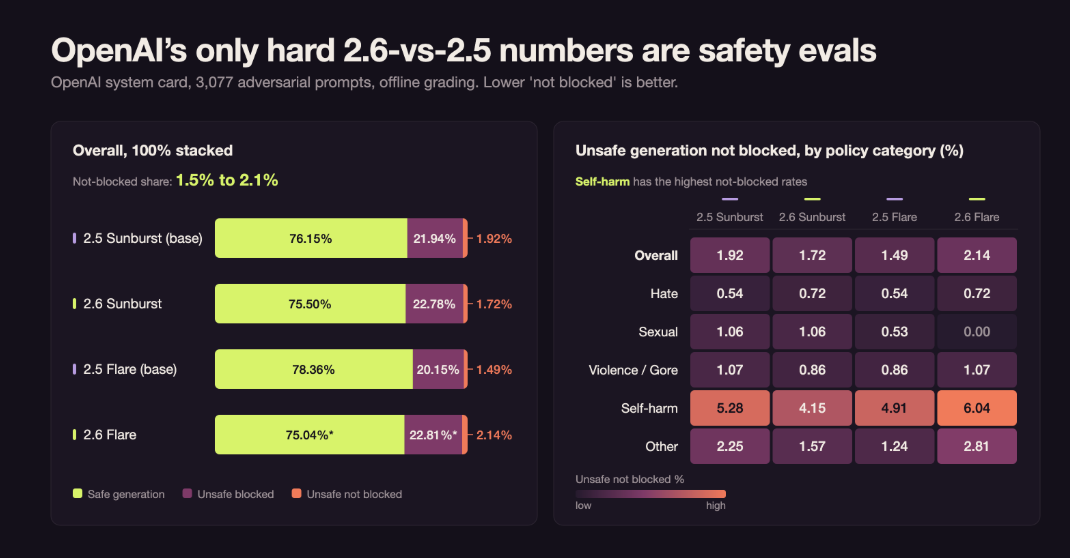
OpenAI ran 3,077 adversarial prompts designed to produce policy-violating images through both generations, with a common reference-grading procedure. Overall, the numbers barely move for Sunburst: safe generation goes from 76.15% to 75.50%, and the "unsafe generation not blocked" rate goes from 1.92% to 1.72%. Neither difference is flagged as statistically significant. Flare moves more: safe generation drops from 78.36% to 75.04%, and the not-blocked rate rises from 1.49% to 2.14%. The safe-generation drop is flagged as statistically significant, as is the corresponding rise in blocked generations; the not-blocked increase is not flagged.
Caveat: this is an offline adversarial evaluation, not production traffic. A small shift in a synthetic test doesn't tell you whether your app got safer. But if you ship user-generated image content, it's still the most concrete new information in the release. The per-policy breakdown is useful too: self-harm has the highest not-blocked rates of any category for every model in the table. 2.6 Flare shows 6.04% there versus 4.91% for 2.5 Flare. Treat the category rows as directional; the card's per-category significance markers are sparser and harder to read than the overall table.
The card also covers GIF-specific safety. OpenAI says GIF generation adds risks that aren't visible in a still frame, such as sexualized motion or meaning that emerges across frames, so it applies motion-aware filters. Its reported GIF moderation recall is 77.7% overall and 96.6% for violent activities. If you let end users create GIFs, keep your own review layer. A 22% miss rate on a targeted adversarial set is not a small number.
Benchmarks: the quality question is still open
If you want a reason to upgrade based on image quality, there isn't one you can verify yet. Artificial Analysis, which runs a widely cited Elo leaderboard for image models, had not listed GPT Image 2.6 on either its text-to-image or image-editing board as of November 5. GPT Image 2.5 still sits at the top of both.
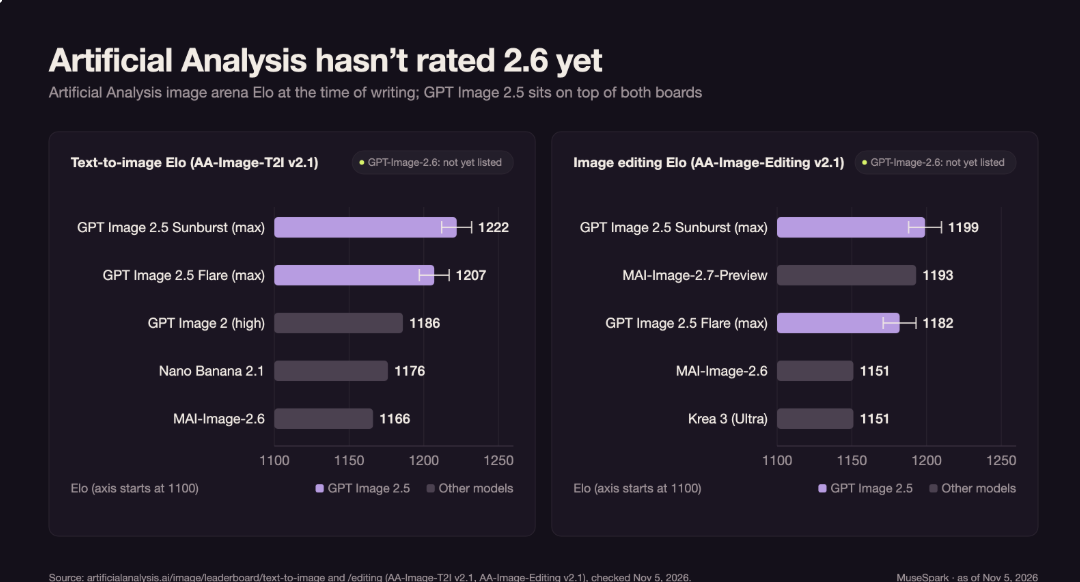
Arena (the LMArena team, now at arena.ai) did report launch scores for 2.6. OpenAI's new models landed high but below the standing 2.5 numbers, and the tiers don't line up cleanly: Arena's 2.6 entries are medium-quality runs, while the 2.5 board rows aren't labeled by quality tier in the snapshots I could see.
Arena board | 2.5 board standing (mixed snapshots) | GPT-Image-2.6 at launch (medium) |
|---|---|---|
Text-to-image | Sunburst 1427 | Sunburst 1409 (#2) |
Text-to-image | Flare 1399 | Flare 1384 (#4) |
Image editing | Sunburst 1517 | Sunburst 1476 (#3) |
Treat that table as a snapshot with caveats, not a verdict. The 2.6 rows are Arena's launch-day entries at medium quality, with vote counts still small. The 2.5 column mixes board snapshots from before and around the launch, without quality tiers attached, so it's directional. I could only read Arena's launch post through reposts, and no stable post URL was available when I checked, so the sources link to the board rather than the specific post.
The only public preference data at launch puts 2.6 close to 2.5, not clearly ahead. That fits a release about control and new formats, not a jump in image quality. Arena also reported that 2.6 runs almost twice as fast as 2.5, which is a bigger speed claim than the launch post's 50%. Different measurement methods, same direction. Neither number is a substitute for timing your own workload.
The diff at a glance
Capability | GPT-Image-2.5 | GPT-Image-2.6 |
|---|---|---|
Output formats | PNG (default), JPEG, WebP | PNG, JPEG, WebP, plus GIF and SVG |
| Not available |
|
Markup-guided edits | Supported | Supported |
Quality settings | low, medium, high, xhigh, max, auto | Same ladder documented; default not published |
Speed label on model page | Flare "Very fast", Sunburst "Medium" | Performance listed as "Not specified" |
Dated snapshot |
| None found in the docs I reviewed |
Batch API | Supported; $15/1M output | Support value not documented on the pages I reviewed |
Streaming / partial images | Yes, 0–3 partial images | Yes; GIF output can't stream. SVG: not documented |
Prompt length | 32,000 characters | 32,000 characters |
Token rates | 5textin/5textin/8 image in / $30 image out | Identical |
Should you switch?
My read: 2.6 is a feature upgrade, not a model-quality upgrade. Its value depends on whether you need the new outputs. For the wider market, our model comparison hub covers the other image options.
Switch now if:
- You need GIF or SVG output. There's no way to get either from 2.5.
- You're building an interactive editor and the speed improvements matter at low quality.
- You're starting a new image feature and there's no migration cost anyway.
Test before switching if:
- You run Batch jobs. Confirm the batch lane and its pricing on 2.6 first.
- Your quality bar is high. No independent quality benchmark for 2.6 is available yet, and the Arena launch scores don't show a clear win.
- You pin model snapshots. The 2.5 models have dated snapshots (
gpt-image-2.5-flare-2026-09-08andgpt-image-2.5-sunburst-2026-09-08); I couldn't find dated 2.6 snapshots in the docs I reviewed. - You depend on the Responses API image generation tool. The tool guide I could see still listed 2.5 and older models, so check that your model string resolves before planning a migration.
The migration itself is boring, which is good news. Change the model ID, keep the same endpoints and response shape, add complexity where you want to control planning, and add output_format only if you need GIF or SVG. Then run your existing prompt suite on both generations and compare the images, not just the latency.
Whatever model you pick, log usage for every image call. Token counts per image are the number that actually determines your bill, and they're the fastest way to catch a quality-tier change before it shows up in an invoice.
Things I couldn't confirm
A few details weren't published anywhere I could find as of November 5, 2026. Check them directly with OpenAI or in your own sandbox before they go into a design doc. Release notes like this live in What's new.
- Whether 2.6 supports the Batch API and the 50% batch output discount.
- Any official per-image cost estimate for 2.6 across quality tiers.
- The full request schema for SVG output, including the authoring model.
- The default quality setting for 2.6 (2.5 defaults to
auto). - Any measured editing-consistency score, despite that being the headline quality claim.
FAQ
Is GPT Image 2.6 better than GPT Image 2.5?
On features, yes: GIF, SVG, and the complexity control are genuine additions. On image quality, there's no published evidence yet — OpenAI published no quality benchmark I could find, and Artificial Analysis hasn't rated 2.6. The Arena launch scores are close to 2.5, with caveats about tiers and dates.
Does GPT Image 2.6 cost more than 2.5?
The token rates are identical. Cost per image can still differ because output tokens vary with size and quality. Measure with your own prompts and log usage.
How do I generate a GIF with the API?
Set output_format="gif" on /v1/images/generations. frame_count defaults to 9 (the API reference says 2–16; the image-generation guide's table says 2–64), and frame_duration_ms defaults to 200 ms. GIF output doesn't stream and can't be combined with masks or partial images.
Do markup-guided edits require GPT Image 2.6?
No. OpenAI's docs say markup-guided editing works on supported GPT Image 2.5 and 2.6 models.
What's the difference between Flare and Sunburst?
Both are the same generation at the same price. Flare is tuned for speed and everyday generation; Sunburst is tuned for detail and editing precision. The 2.6 launch post says Flare also improved layout quality for posters and product imagery, and Sunburst improved consistency across edits at medium and high quality.
Is GPT Image 2.5 being deprecated?
OpenAI announced no deprecation with the 2.6 launch. The older gpt-image-1 model was shut down on October 23, 2026, and DALL·E models retired earlier in the year, so the line does move. 2.5 is still current.
Sources
- Introducing Images 2.6 — OpenAI, November 4, 2026
- Introducing ChatGPT Images 2.5 — OpenAI, September 8, 2026
- GPT-Image-2.6 Flare and GPT-Image-2.6 Sunburst model pages
- GPT-Image-2.5 Flare and GPT-Image-2.5 Sunburst model pages
- Image generation guide and image prompting guide
- Create image API reference and create image edit reference
- ChatGPT Images 2.6 system card — OpenAI Deployment Safety Hub
- AA-Image-T2I v2.1 leaderboard and AA-Image-Editing v2.1 leaderboard — Artificial Analysis
- Arena image leaderboard — Arena launch-post scores for 2.6 quoted via reposts, November 4, 2026