 99.9% SLA
Video Outpainter: Expand Video Beyond the Frame - Full Review
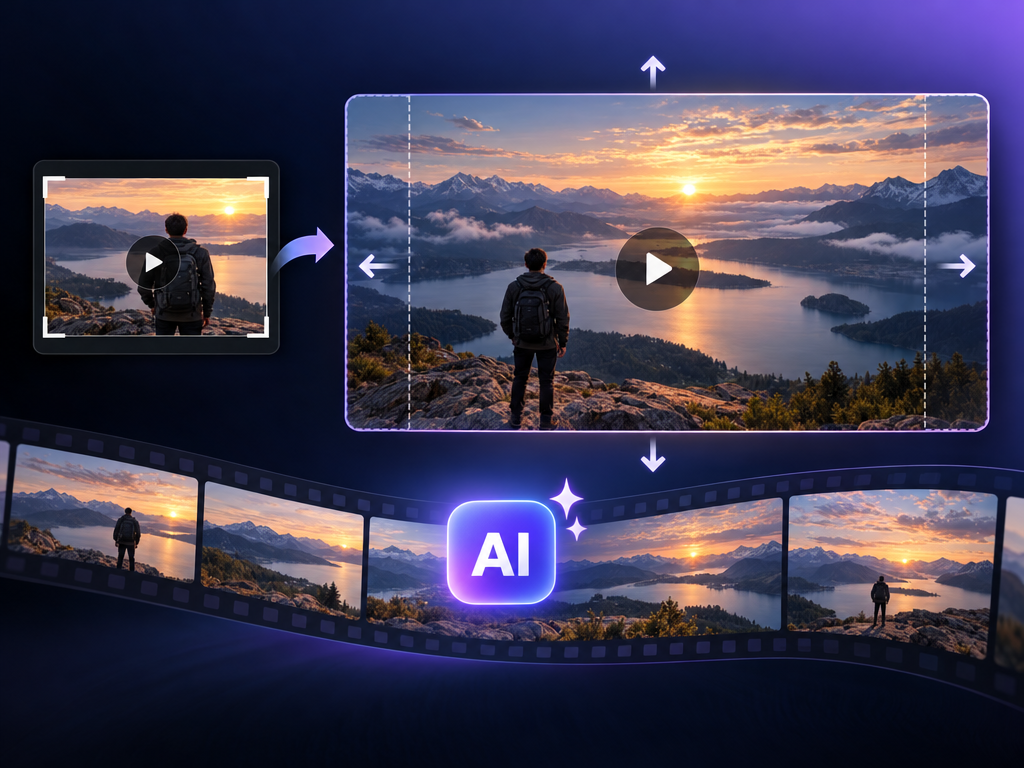
Video Outpainter (this catalog entry: video-outpainter) is a hosted AI model that expands video beyond its original frame boundaries - changing aspect ratios, reframing shots, adding safe margins, and generating new visual context without cropping or losing content.
Here's the short version: this is the "make my video fit another format" model. Where cropping throws away content, outpainting invents the missing context - the pixels outside the original frame are generated to match the scene. It is the practical tool for adapting 16:9 footage to vertical social formats, adding safety margins for broadcast, or reframing shots. The honest caveats: it is a black-box hosted surface without an official spec sheet, and generated context quality varies - seamless is the goal, not always the result.
This guide covers model overview, core features, technical specifications, capability comparison, core advantages, recommended use cases, example prompts, selection recommendations, workflow, and my verdict.
Quick Facts
| Attribute | Value |
|---|---|
| Catalog slug | video-outpainter |
| Task | Video outpainting (frame expansion) |
| Output | Video with extended frame context |
| Use cases | Aspect-ratio change, reframing, safe margins, new context |
| Approach | Generate missing context, no cropping |
| Hosting | Black-box API |
| Self-hosting | No |
Table of Contents
- Model Overview
- Core Features
- Technical Specifications
- Capability Comparison
- Core Advantages
- Recommended Use Cases
- Example Prompts
- Selection Recommendations
- Workflow: Expand, Validate, Export
- The Bottom Line
- FAQ
- Sources & Further Reading
1. Model Overview
Video outpainting is the motion version of image outpainting: the model analyzes a video, understands the scene and motion, and generates the pixels that would exist beyond the original frame edges - then re-renders the video with a larger frame.
The practical driver is format adaptation. Platforms demand different aspect ratios (16:9 web, 9:16 vertical, 1:1 feeds), and cropping destroys composition. Outpainting keeps the original content and invents complementary context: the rest of the room, the continuation of the road, the sky above the subject.
This catalog entry is a hosted black-box surface - the category itself is established in the AI video editing stack, with related capabilities (video repainting, inpainting) documented by major vendors like Alibaba's Wan VACE line.
2. Core Features
Frame expansion. Generate pixels beyond original boundaries.
Aspect-ratio change. 16:9 to 9:16 and other format adaptations.
Reframing. Shift composition without losing content.
Safe margins. Add padding for broadcast and platform UI.
New visual context. Scene-consistent invented surroundings.
No cropping. Original content preserved.
3. Technical Specifications
| Specification | Detail |
|---|---|
| Task | Video outpainting |
| Input | Video |
| Output | Video with expanded frame |
| Changes | Aspect ratio, framing, margins |
| Approach | Generated context, content preserved |
| Delivery | Async API (typical) |
| Spec sheet | Not published (black box) |
Warning: No official vendor spec sheet exists for this entry. Verify supported formats, expansion limits, and quality on your own test clips.
4. Capability Comparison
| Capability | Video Outpainter | Cropping/reframe tools | Wan VACE (repaint) | Image outpainting |
|---|---|---|---|---|
| Content preservation | Yes (invents context) | No (loses content) | Yes | Yes |
| Aspect-ratio adaptation | Yes | Yes (lossy) | Partial | Yes |
| Motion-aware context | Yes | No | Yes | No |
| Control | Black box | Full manual | Prompt-based | Prompt-based |
| Cost | Per job | Free/manual | Per job | Per image |
Reading the table honestly: outpainting is the only automatic path that preserves content while changing format. Manual reframing gives control but loses pixels; Wan VACE-class tools add prompt control for related edits.
5. Core Advantages
- No content loss. The original frame stays intact.
- Format adaptation. Vertical/horizontal/square without re-shooting.
- Reframing power. Composition changes impossible with crop.
- Safe margins. Broadcast and platform-safe padding.
- Scene-consistent context. Generated surroundings match the scene.
6. Recommended Use Cases
- Social format adaptation: 16:9 to 9:16 for Reels/Shorts/TikTok.
- Broadcast margins: safe-area padding for TV and digital signage.
- Reframing: shift the subject within a wider canvas.
- Cinematic release: 2.39:1 to 16:9 versions.
- Ad platform compliance: format variants for ad networks.
- Archival restoration: context extension for old footage.
7. Example Prompts
1. Vertical adaptation
2. Safe margins
3. Cinematic reframe
Prompting guidance:
- State the target aspect ratio and what must stay unchanged.
- For complex scenes, describe the expected context (sky, room, road).
- Validate motion continuity at the seams - that is where artifacts appear.
8. Selection Recommendations
Choose a video outpainter if:
- Format adaptation without cropping is the requirement.
- You need safe margins or composition reframing.
- Generated context quality passes your validation.
Choose manual reframing if:
- You need pixel-perfect control and have editor time.
- The scene cannot plausibly be extended (hard cuts, text edges).
Choose Wan VACE-class tools if:
- You need prompt-based repainting with official vendor support.
Test before committing if:
- Seam quality is brand-critical - outpainting artifacts are the main risk.
9. Workflow: Expand, Validate, Export
Practical notes:
- Test short clips first; seams and motion are the failure modes.
- Describe expected context for unusual scenes.
- Keep masters; outpainting creates new versions.
10. The Bottom Line
Verdict: Use for format adaptation - with seam validation required. Video outpainting solves a real production problem: adapting video to new formats without cropping away content. This black-box entry does the job if its generated context passes your quality bar - and for social, broadcast, and ad-platform formats, that is often the only automatic path. Test seams and motion on your hardest footage before trusting it at scale; for controlled work, vendor-supported repaint tools are the safer alternative.
Sources & Further Reading
- Wan VACE video editing guide - Alibaba Cloud
- Video editing 2.1 (repaint/outpaint context) - Alibaba Cloud
This entry is a black-box hosted model without an official spec sheet. Capability details reflect the category and related vendor documentation as of August 2026; validate your endpoint.