 99.9% SLA
AI Image Eraser: Object Removal Review & Practical Guide
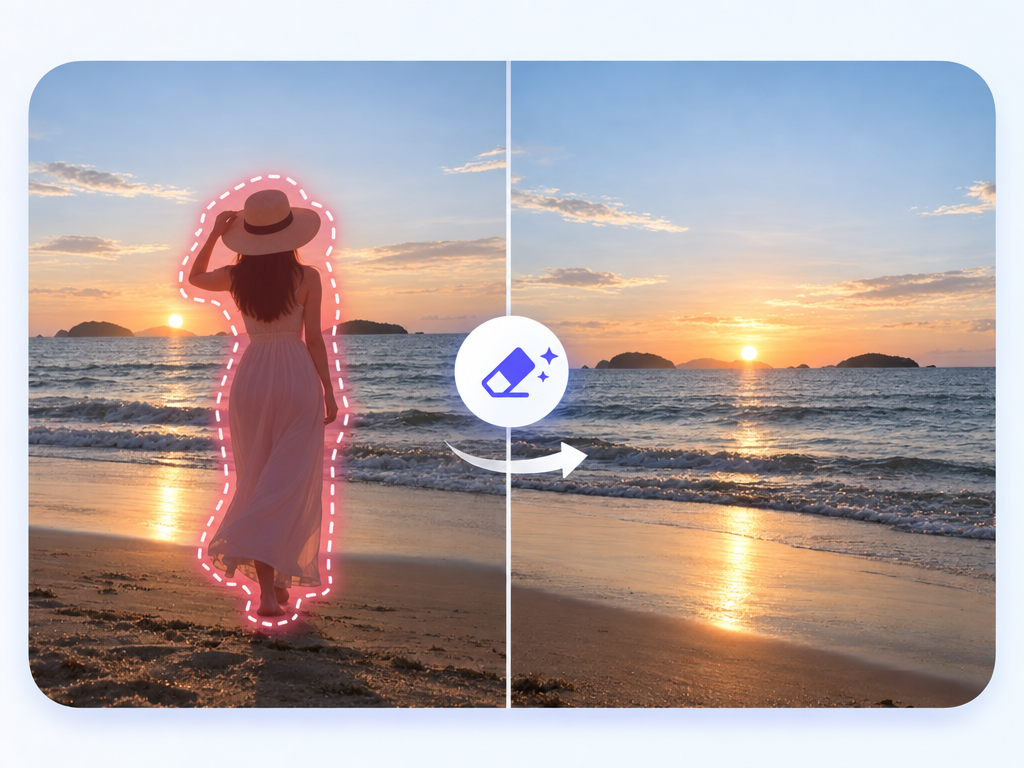
AI Image Eraser removes objects, people, or text from photos and reconstructs the background behind them with natural detail and consistent lighting. It is the general-purpose cleanup tool of the AI image-editing category - the one you reach for when something in a photo shouldn't be there.
The quality question is always the reconstruction. Removing a subject is easy; making the scene look as if it was never there - continuing textures, patterns, and lighting through the removed area - is the hard part, and it's the part that decides whether the result is usable.
Quick Facts
| Attribute | Value |
|---|---|
| Tool name | AI Image Eraser |
| Tool ID | image-eraser |
| Category | AI photo editing / cleanup |
| Primary task | Remove objects, people, or text and reconstruct backgrounds |
| Input | Photo with unwanted elements |
| Output | Cleaned photo |
| API | REST inference, no cold starts |
| Best for | Travel photos, product cleanup, social content, archival work |
Table of Contents
- First Impressions
- Core Features
- What to Watch For
- Core Advantages
- Best Use Cases
- Who Should Use It
- FAQ
1. First Impressions
The reconstruction is the story: remove a photobomber from a travel shot and the wall or landscape behind them comes back with matching texture and lighting. On typical scenes, the edit is invisible to a casual viewer.
It handles the full range - objects, people, text - with consistent quality, which makes it a practical one-stop cleanup tool for photos.
2. Core Features
- Broad removal scope: objects, people, and text.
- Natural reconstruction: backgrounds rebuilt with consistent detail and lighting.
- Edge-aware blending: the removed region merges seamlessly with the surroundings.
- Quality preservation: the rest of the image is untouched.
- REST inference API: no cold starts for editing products and batch work.
3. What to Watch For
- Patterned backgrounds are harder: repeating textures and grids require careful reconstruction.
- Large removals mean more inference: the bigger the erased area, the more the model must invent.
- Reflections and shadows: removing a subject can leave its shadow or reflection behind - check for remnants.
- Review before publishing: spot-check edges and texture continuity at full zoom.
4. Core Advantages
- One-tool cleanup: people, objects, and text handled in the same workflow.
- Invisible edits: reconstruction quality makes results usable without further retouching.
- Fast and repeatable: clean up a batch of photos quickly.
- Integration-ready: fits consumer and professional editing products.
5. Best Use Cases
- Cleaning photobombers and tourists out of travel photos.
- Removing clutter from product and real-estate shots.
- Erasing unwanted text or signage.
- Fixing composition by removing distracting elements.
6. Who Should Use It
Pick it up if you clean up photos regularly - travel, products, real estate, or social - and want natural, one-pass removal.
Skip it if the elements cover large, complex, patterned regions, or if removing them would misrepresent an image in a context where accuracy matters (news, evidence).